Master Your 2026 Facebook Content Strategy with This Canva Planner
Consistency is the engine of social media growth, but let's be honest: maintaining a consistent posting schedule on Facebook can feel like a second job. Between crafting captions, sourcing images, and figuring out the best times to post, the creative process often gets bogged down by logistical headaches. If you are a small business owner, a content creator, or a digital marketer, you know that "winging it" usually leads to burnout. That is exactly why having a structured planning tool isn't just a luxury—it's a necessity for surviving the 2026 algorithm updates.
What Exactly is the 2026 Post Planner?
Imagine a centralized command center for your entire year of social media activity. The 2026 Post Planner for Facebook Canva Template is exactly that—a robust, visually organized system designed to bridge the gap between your creative ideas and your publishing schedule. Unlike generic spreadsheet calendars, this is a fully designed digital asset that combines the functionality of a traditional planner with the visual appeal of professional graphic design.
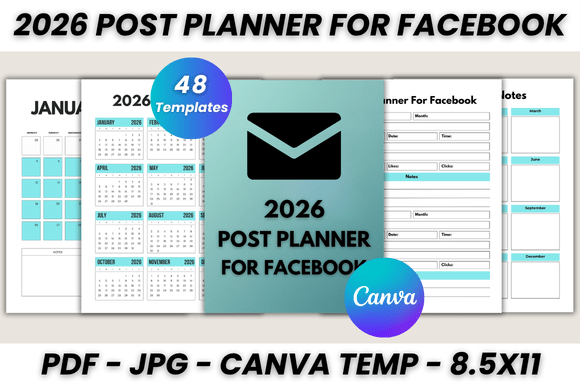
At its core, this package is a digital download containing a massive 48 printable pages. It is built specifically for the user who values both aesthetics and efficiency. The visual style of the planner is clean, modern, and minimalist, ensuring that the structure supports your workflow rather than cluttering it. It doesn't scream for attention with neon colors or distracting patterns; instead, it uses a sophisticated layout that makes reading dates and jotting down post ideas effortless. This modern typography approach ensures that whether you are viewing it on a tablet or printing it out for your desk, the information hierarchy is immediately clear.
Breaking Down the 48-Page Toolkit
The value of a premium font or template lies in its versatility, and this planner delivers on that front. It isn't just a grid of dates; it is a comprehensive organizational tool. The content is divided into specific sections to cover every aspect of your planning process.
First, you get the foundational elements: a Belongs To page to personalize your planner, followed by a comprehensive 2026 Calendar for a bird's-eye view of the year. From there, the structure dives deep into the specifics with a 2026 Monthly Planner that takes you chronologically from January through December. This allows you to map out major holidays, product launches, and seasonal campaigns well in advance.
However, the real powerhouse of this collection is the dedicated Post Planner for Facebook section. This includes 30 printable pages specifically designed for content scheduling. For a social media manager, this is where the magic happens. You aren't just writing "Post photo" on a Tuesday; you have space to draft the actual content, note the target audience, and track the visual assets you intend to use. Additionally, the inclusion of Important Notes and general Notes sections ensures you have a scratchpad for brainstorming brand identity ideas or tracking analytics, accompanied by a polite Thank You page to round out the document.
The Canva Advantage: Customization and Brand Identity
One of the biggest hurdles in using pre-made planners is that they often don't "feel" like your brand. You might find a layout you love, but the font is too whimsical for your corporate image, or the colors clash with your logo design. This is where the integration with Canva changes the game.
The template is provided as an Editable Canva Template, meaning you can alter every single element. If you are a designer, you understand the importance of consistency. You can match the typeface used in the planner to your existing brand identity. Whether you prefer a sans serif font for a clean, tech-forward look or a serif font for a more editorial, established vibe, you have full control to change the typography.
You don't need to be a tech wizard to do this. You simply need a free Canva account. Once you access the file, the interface allows you to drag and drop your own photos, change the color palette to match your hex codes, and even adjust the layout style. This level of customization transforms the planner from a generic tool into a bespoke piece of design assets that feels native to your business. It effectively allows you to create a social media graphics strategy tool that is as polished as the content you intend to produce.
Practical Application: From Screen to Print
While many of us work digitally, there is a psychological benefit to having a physical plan in front of us. The 2026 Post Planner for Facebook Canva Template is optimized for both digital viewing and high-quality printing. The files come in US Letter size (8.5 x 11), which is the standard for home printers and office supply stores. However, because it is a vector-based template in Canva, you can easily resize it to A4 or even larger formats without losing resolution.
For the workflow, the process is designed to be frictionless. After purchasing, you receive a downloadable PDF that contains the direct link to the Canva editor. You also receive a Bonus: JPG files of the unedited pages, which is useful if you want to quickly reference the layout on your phone or tablet without opening the editor.
Here is a realistic scenario: You are a blogger planning your Q1 content. You open the editable files in Canva. You customize the header with your blog's script font logo. You then use the monthly view to mark out a "Spring Cleaning" theme for March. You move to the daily post planner section to draft specific Facebook updates, perhaps planning a series of carousel posts. Once satisfied, you save the file as a PDF. You can then print the entire month of March and pin it above your desk. This tactile connection to your schedule often helps in visualizing the flow of content, aiding in visual hierarchy and narrative consistency.
Who Needs This Level of Organization?
This resource is not just for social media managers. It is an essential tool for a wide range of creative professionals. If you are involved in packaging design, you can use the planner to schedule product reveal posts. If you are a photographer, you can plan your portfolio drops. The versatility of the Canva Template makes it suitable for anyone who needs to communicate visually and consistently.
It is particularly useful for those who struggle with font pairing and design consistency. By creating a "template" for your planning, you train your brain to think in systems. When you sit down to actually create the web design elements or editorial design for your posts, you already have a roadmap. You know what the goal is, what the text should say, and how it fits into the larger monthly narrative.
Ultimately, the 2026 Post Planner for Facebook Canva Template is about removing the friction between your business goals and your daily actions. It provides the structure you need to be consistent, the flexibility you need to be creative, and the professional polish that your brand identity