Streamline Your 2026: The Ultimate Canva Office Planner
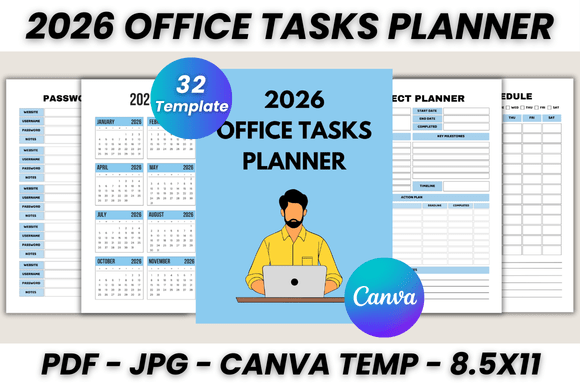
As we approach 2026, the line between our digital and physical worlds continues to blur, especially in how we manage our professional lives. We juggle digital calendars, physical notebooks, and a dozen apps, often creating more chaos than clarity. The solution isn't just another tool; it's a unified system. The 2026 Office Tasks Planner Canva Template is designed to be that central hub, a beautifully crafted, 32-page digital planner that you can customize in Canva and print to your exact needs. It’s a complete command center for the year ahead, built for the modern professional who values both aesthetics and efficiency.
More Than a Planner: A Visual Command Center
This isn't a generic, one-size-fits-all planner. Its visual personality is one of clean, professional minimalism, designed to reduce cognitive load and bring a sense of calm to your busy schedule. The layout prioritizes clear visual hierarchy and ample white space, making it easy to scan and find information at a glance. This approach to modern typography ensures that your most important tasks and appointments stand out without the page feeling cluttered. The overall appeal lies in its versatility; it’s a sophisticated design asset that feels personal yet professional, making it suitable for everything from a freelancer’s home office to a corporate boardroom.
The strength of this template lies in its comprehensive nature. It’s not just a calendar; it’s a holistic planning system. You’ll find dedicated pages for every aspect of your work life:
- Strategic Overview: Start with a 2026 Calendar for a bird's-eye view, then drill down with a Yearly Overview to set long-term goals.
- Detailed Planning: Use the Monthly Planner for big-picture deadlines, the Weekly Schedule for time-blocking, and the Daily Planner for granular task management.
- Project Management: Keep complex initiatives on track with dedicated Project Planner and Project Timeline pages.
- Essential Utilities: Manage your network with a Contact List and Meeting List, track leads with a Lead Follow Ups sheet, and keep sensitive information secure with a Password Tracker.
This structure provides a seamless flow from annual goals to daily actions, ensuring nothing falls through the cracks. It’s a practical system that supports real-world project management and daily execution.
The Power of Customization: Making It Uniquely Yours
The true genius of the 2026 Office Tasks Planner Canva Template is its integration with Canva. This editable Canva template empowers you to become the designer of your own productivity tool. You don't need to be a graphic design expert to make it look stunning. With a free Canva account, you can effortlessly align the planner with your personal or brand identity.
Think of it as a foundational typeface for your year—it provides the structure, but you control the expression. You can:
- Match Your Brand: Easily change colors and fonts to match your company’s branding, creating a consistent and professional look across all your materials.
- Personalize the Layout: Adjust the layout, add your own logo to the Belongs To page, or even insert new pages if needed. The flexibility is unparalleled.
- Optimize for Readability: Experiment with different font pairings to find what works best for your eyes. A clear sans serif font for headings can create a strong hierarchy, while a legible serif or sans serif for body text ensures comfortable reading.
This level of customization transforms the planner from a simple utility into a powerful extension of your personal brand. It’s a premium font and design system that you control, ensuring the final product is a perfect fit for your workflow and aesthetic preferences.
Beyond the Office: A Versatile Tool for Every Creator
While its name suggests an office focus, the applications for this template extend far beyond the corporate world. Its clean and adaptable design makes it an invaluable resource for a wide range of creative professionals and entrepreneurs.
- For the Blogger and Content Creator: Use the Monthly Planner to map out your content calendar, the Project Timeline for a product launch, and the To Do List for daily writing and promotion tasks.
- For the Small Business Owner: The Project Planner is perfect for tracking client work, the Lead Follow Ups sheet is essential for sales, and the Call To Make list ensures you never miss an important connection.
- For the Designer and Crafter: Use the Schedule to block out studio time, the My Notes and Notes pages for sketching ideas, and the Contact List to keep track of suppliers and clients.
This planner is a practical example of how thoughtful editorial design can enhance productivity. The included editable files and bonus JPGs mean you have a flexible system ready for any project. It’s a comprehensive set of design assets that helps you maintain consistency and professionalism, whether you’re printing pages for a binder or using them digitally. By centralizing your planning in one beautifully designed, customizable system, you free up mental space to focus on what truly matters: creating, building, and growing your vision for 2026 and beyond.