2026 Undated Digital Planner Canva: Your Flexible Command Center
Staring at a blank page is a creativity killer. For entrepreneurs, content creators, and busy professionals, the friction of setting up a planning system from scratch often derails the productivity process before it begins. You need structure, but you also need flexibility. This is the core value proposition of the 2026 Undated Digital Planner Canva. It isn't just a static PDF; it is a fully editable ecosystem designed to adapt to your specific workflow, whether you are managing a content calendar for a marketing agency or tracking personal wellness goals.
The Anatomy of a Functional Design System
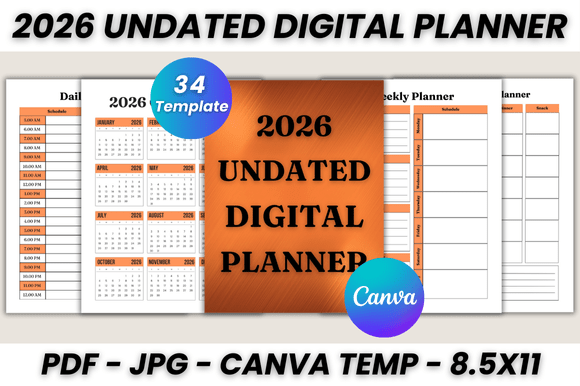
When we talk about modern typography and layout in the context of planning, we aren't discussing abstract theory. We are discussing usability. This 2026 Undated Digital Planner Canva Template functions as a comprehensive design asset. With 34 printable pages, the visual hierarchy is established through clean lines and ample white space, ensuring that your schedule doesn't look cluttered even when it is full.
The package includes distinct sections that cover the entire spectrum of planning:
- Foundational Pages: A "Belongs To" page and a 2026 Calendar overview for quick reference.
- Macro Planning: Dedicated Monthly Planner pages for every month from January to December, allowing for long-term goal setting.
- Micro Planning: Granular control with Daily Planner and Weekly Planner layouts. These pages utilize a grid structure that balances text blocks with checkbox areas.
- Niche Utilities: A specialized Weekly Meal Planner for health-conscious users, alongside a robust To-do List and two pages of Notes.
Visually, the template leans toward a sans serif font aesthetic for headers, promoting readability across digital screens and printed paper alike. The style avoids overly decorative script fonts in the functional areas, prioritizing legibility over ornamentation. This creates a neutral canvas that supports your brand identity rather than clashing with it.
Customization: The Canva Advantage
The defining feature of this system is the Editable Files component. Unlike a locked PDF, this is a premium font and layout experience accessible via a free Canva account. You have total control over the typeface choices, sizes, and colors. If your brand uses a specific serif font for elegance or a bold display font for impact, you can swap them in seconds.
Consider the practical applications for different audiences:
- For the Brand Strategist: You can import your client's color palette to create a mock-up content calendar that aligns with their brand identity.
- For the Small Business Owner: Use the Weekly Meal Planner for team lunch schedules or the To-do List for inventory management.
- For the Content Creator: The 2026 Monthly Planner serves as an editorial calendar, while the Notes pages act as a repository for video scripts or blog ideas.
This flexibility transforms the planner from a simple scheduling tool into a piece of editorial design. You are not just filling in boxes; you are curating a visual workflow that supports your specific operational needs.
Visual Hierarchy and Brand Perception
How you organize information dictates how you process it. This template utilizes a font pairing strategy that balances hierarchy with harmony. By using distinct weights for headings versus body text, the planner guides your eye naturally from the date down to the specific task. This is a critical component of web design and social media graphics, and it applies equally to personal planning.
When you print these pages—optimized for US Letter size (8.5 x 11) but resizable—the readability remains consistent. The layout avoids the cramped feeling of traditional planners, offering breathing room for notes and adjustments. This attention to negative space makes the planner feel more like a high-end creative font showcase than a utilitarian spreadsheet.
Practical Implementation and Workflow
Getting started requires no technical expertise. After purchase, you receive a PDF containing the direct link to the Canva template, plus bonus JPG files for quick digital use. Here is how to integrate this into your routine:
- Duplicate and Edit: Once you open the link in Canva, duplicate the entire design. This preserves the original template while you customize your version. Edit the fonts, adjust the layout style, and add your logo.
- Digital vs. Print: If you use an iPad with an Apple Pencil, the "Print" step is replaced by "Export as PDF." You can then annotate directly on the pages using apps like GoodNotes. For physical use, the US Letter size format prints perfectly on standard home printers.
- Iterative Design: Because the 2026 Undated Digital Planner Canva is undated, you can reuse the structure year after year. If a specific layout for the Daily Planner isn't working, simply redesign that single page without affecting the rest of the system.
This approach treats your planner as a living document. It acknowledges that your needs in January might differ from your needs in July. By combining the structure of a 2026 Undated Digital Planner Canva Template with the creative freedom of Canva, you build a system that grows with you. It is a practical application of design assets solving real-world organizational challenges.